AWS
Cloud principle of elasticity: system scales to the required capacity based on changes in demand.
AWS Management console is the Web UI for managing your AWS resources. You can do the same via the CLI or API as well.
Cloud Principles
- design for failure and nothing will fail
Concepts
golden image: "master" version of an OS or software environment, a perfect "snapshot" to use as a template. When you need to set up new servers you need to install everything from scratch.
golden image is usually refers to a full virtual machine or physical disk image that includes an entire OS kernel. But a Docker Image is a golden image for a specific application
decoupling resources: separating components of a system so that they can operate, scale and fail independently.
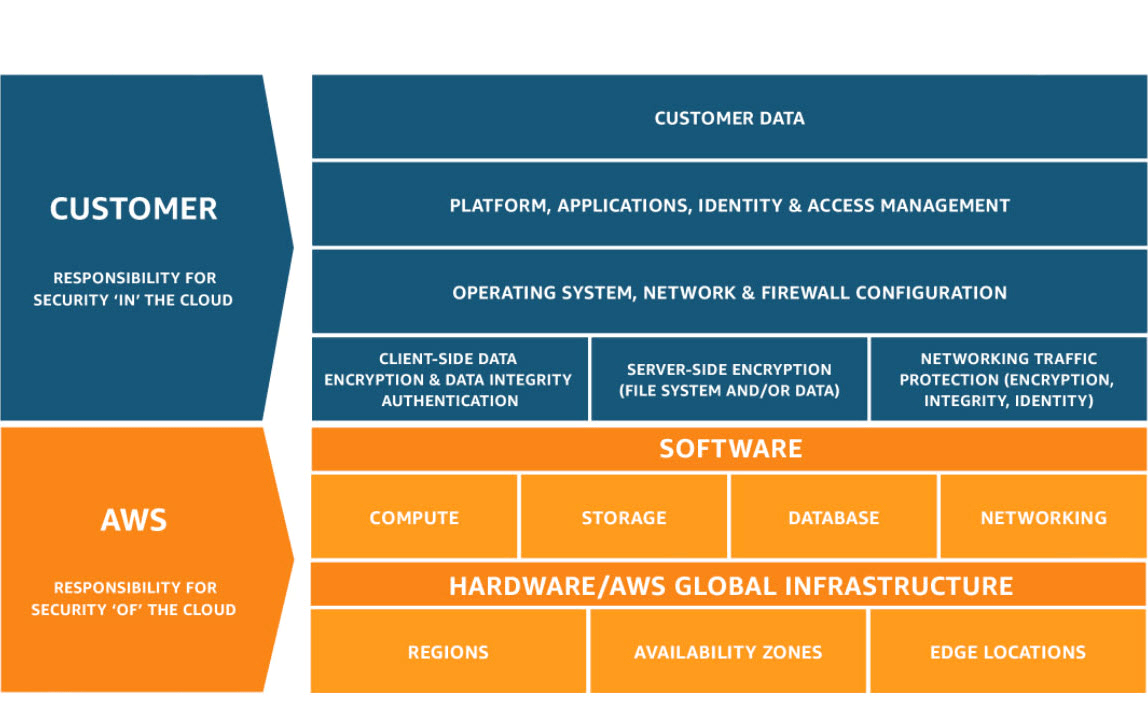
shared security model: security and compliance is a shared responsibility between AWS and the client.
- This shared model can help relieve the customer’s operational burden as AWS operates, manages and controls the components from the host operating system and virtualization layer down to the physical security of the facilities in which the service operates. The customer assumes responsibility and management of the guest operating system (including updates and security patches), other associated application software as well as the configuration of the AWS provided security group firewall
--
Infrastructure
Regions: broad geographic areas. They are completely independent physical locations where AWS clusters its data centers.
- A disaster in one region won't affect others. data isn't automatically replicated within regions, you must configure this if you wish.
- compliance and latency. You pick them based on where your users are and where your data is legally allowed to sit.
examples: us-east-1, eu-west-1
Availability Zones: specific data centers within regions.
- every region has at least 3 AZs.
for High Availability. You use multiple AZs within a single region so that if one data center fails, your app stays online.
Edge Locations: content is even closer to users. They are specialized data centers to cache content.
- you can't run full EC2 instance or DB in edge.
- over 750 edge locations in the world, compared to 39 regions.
- edge locations use the following services: Amazon Cloudfront (CDN), Route 53 (DNS), Shield & WAF (security) for filtering out malicious traffic and DDoS at the edge, S3 Transfer Acceleration.
pricing
For renting servers there is on demand, which is the most expensive, but you can also rent Reserved Instances (RI) for periods of 1 or 3 years you are obliged to pay for. You can pay nothing, partially or everything upfront for bigger discounts.
AWS Support: are a collection of Plans that provide various lvls of technical assistance and tools to manage your AWS environment.
- Enterprise gives access to Support Concierge - faster response times from support
Services
-
Route 53: DNS (Domain Name Service). registering new domains.
-
Cloudfront: CDN, edge static content distribution (such as html, js, css, imgs...)
-
Shield: provides managed distributed denial of service (DDoS) protection for apps running in AWS.
- has 2 tiers; one free standard and an advanced on for enterprise.
- think Shield standard as a default feature that's always on
-
WAF (Web App Firewall): custom rules to block malicious traffic.
-
VPC (Virtual Private Cloud): lets you launch AWS resources into a logically isolated virtual network that you define. It has it's own subnets, route tables, internet gateway (IGW), Security Groups & NACLs
- when you creat an account you get a default VPC in every region. Manual VPCs can be used for custom requirements like isolating sensitive data, custom IPs, hybrid cloud...
- region specific
-
Cloudformation: infrastructure as code - Terraform competitor
-
Trusted Advisor: provides recommendations about security, performance, cost optimization and fault tolerance.
-
Inspector: automated vulnerability management service. Scans AWS workloads for software vulnerabilities and unintended network exposure
-
IAM (Identity and Access Management): manage AWS user permissions.
-
KMS (Key management service): secrets
-
AWS Image Builder: automate the creation, testing and distribution of "golden" images.
-
Kinesis: platform for real time streaming, allowing to collect, process, and analyze video and data streams in real time.
billing
- Cost Explorer: display distribution of AWS spending
- Cost and Usage Reports: billing info and history.
- Pricing / TCO (Total Cost of Ownership) Calculator: to derive the cost of moving onpremise servers to AWS.
- Consolidating Billing:
Compute
AWS Compute Services Comparison
-
AWS EC2 (Elastic compute cloud): on demand compute, virtual machine, virtual server.
- Amazon Machines Image (AMI): an image that provides the software that is required to set up and boot and EC2 instance. You must specify an AMI when you launch an instance, for example you can choose a Ubuntu image for your EC2 instance.
-
ECS (Elastic Container Service): manager for containers. orchestrator. often manages EC2 instances. You define Tasks (containers).
- you tell AWS "I have a docker image, run 5 instances of it"
- You have 2 main options for where to put the containers: EC2 and Fargate
-
EKS
-
Fargate: pay as you go service that lets you run and scale containerized apps without managing servers.
- serverless compute engine for containers. it works with ECS (and EKS) to run your containers without you ever having to see, manage or patch a virtual machine.
-
App Runner: you simply point to a GitHub repo or Docker image and the service automatically builds, deploys and scales the web service.
- like Vercel's one-click deployments
- no need to configure ECS, load balancers, VPCs..
-
Lightsail: simplified version of AWS for ppl who find the main console overwhelming. Flat monthly fee $
- AWS' version of DigitalOncean or Linode
- best for wordpress sites and blods
Choose EC2 if your app isn't containarized and ECS if you are using Docker, it handles the heavylifting of restarting failed containers and spreading them across different zones.
-
Elastic Beanstalk: compute for web apps, AMI with web stack installed (Ruby, php...)
-
MWAA (Managed Workflows for Apache Airflow)
Storage
see Types of Storage
-
Elastic Block Store (EBS): acts like a virtual hard drive, persists even after EC2 stops, unlike EC2 Instance Store.
-
Elastic File System (EFS)
-
S3: File storage
- uses Buckets, which are containers for data. You store Objects (files + metadata)
- great for serving web static content. It's good bc it offloads serving files from the backend server (which obviously involves processing HTTP requests)
- Transfer Acceleration: significantly reduces file transfer time (paid extra feature, it uses CloudFront CDN)
- have lifecycle configurations for things like deleting or moving things to another storage class after a certain amount of time or event.
- has different storage classes that has a different offer different balance in cost, availability and retrieval time.
-
RDS: fully managed relational DB. similar to installing DB engine on EC2 manually but leaving provisioning and maintenance to AWS.
- supports most SQL DBs.
- it's possible to set up automatic scaling (increase in storage size), but it's not native like Aurora
-
Aurora: Relational DB
- storage is separate from the instance. 6 copies in 3 availabitlity zones.
- native scaling
- just postgres and mysql
- more expensive but better in most senses; performance, availability and durability, resiliency, storage, scalability...
-
The dif between RDS and Aurora is that
-
DynamoDB: NoSQL DB
-
ElastiCache
-
Redshift: data warehouse,
-
- Integrated into S3 as a storage class. Glacier as a separate service is now deprecated.
- vaults are the data container for legacy Glacier. You store Archives which are single, often massive zip files.
- with the cheapest option it can take many hours - 2 days to retrieve data.
Vaults and buckets
- Backup
- AWS Storage Gateway
Logs
-
Cloud Watch: monitoring performance and health of your resources. (what is happening)
- Cloud Watch Events
-
Cloud Trail Logs: audit actions taken within your account (who did what)
-
Event Bridge:
-
SQS (): message queue
- pulling msgs and ensuring they are processed one by one (Queue)
-
SNS (Simple Notificaion Service): message delivery from publisher to subscribers.
- high-throughput, push-based, many-to-many messaging.
- msg are pushed to a Topic, instead of directly to every single client. Clients have to subscribe to that topic and decide how they want to receive that msg (some clients might want SMS over email..)
- app to app: sending msgs to multiple SQS or Lambda functions at once. And Microservices: decoupling services so they can communicate without being directly linked.
- app to person: mobile push, SMS, email
Permissions
AI/ML
..
Quantum
..
network components
many services have fundamental networking components
- Security Groups (Resource-Level): act as a firewall for individual resources. You can apply them to RDS, Lambda, Load Balancers, Elasticache...
- stateful: traffic in is automatically allowed out
- Network ACLs (Subnet-Level): act as a firewall for an entire Subnet. They affect every single resource inside that subnet.
- stateless: you must write rules for both ways, in and out.